
Everything the office does, in one place.
Nine jobs run a brokerage back office. Here is each one, and what Avlira does with it.
Today screen
One screen at 8am: what needs you.
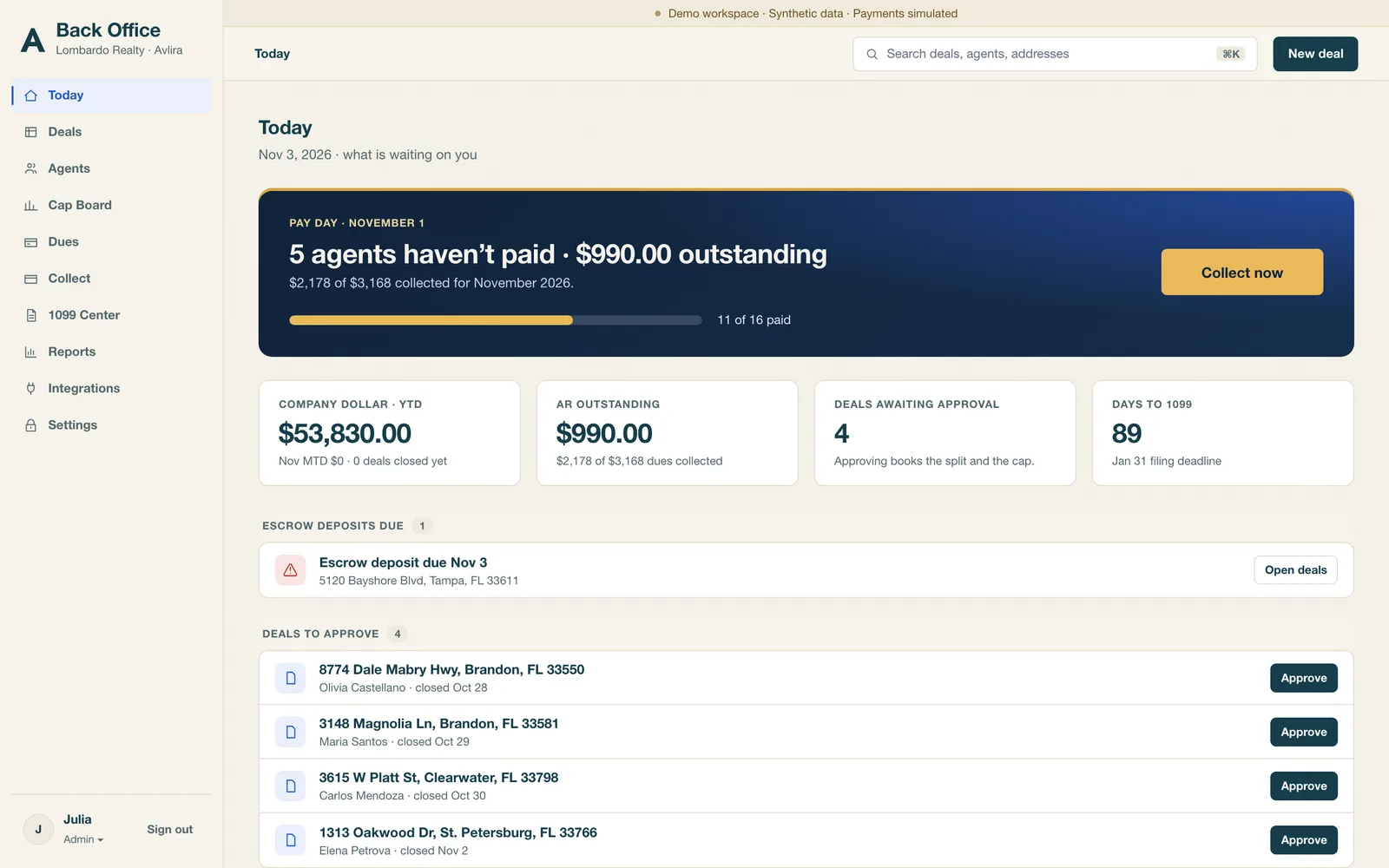
The Today screen is where the day starts. It shows which agents have not paid dues on pay day, which deals are waiting for approval or payout, which closed dotloop transactions haven't been entered yet, and which new agents are waiting on a step. Each item is one line with the action next to it. If the list is empty, the day is clear.
- Pay-day dues status for every agent, live
- Commission items that cannot be finalized yet, and why
- Transaction and document items waiting on someone
- Onboarding steps waiting on an agent, or ready for you to activate
One-tap dues follow-up
Collect dues without writing the same text eleven times.
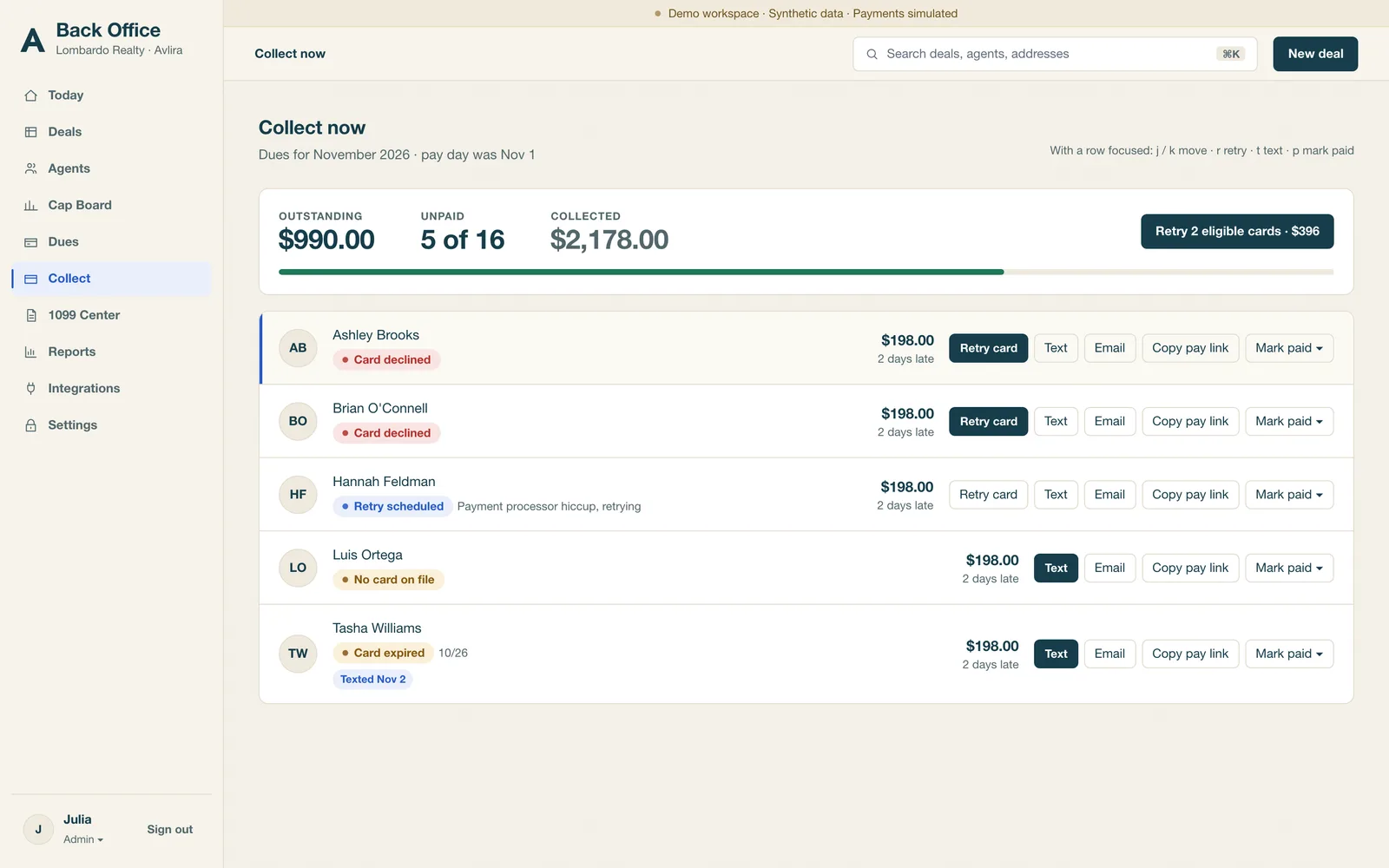
On pay day, Avlira lists the agents who have not paid. Pick an agent, and Avlira opens a pre-written text or email — polite, plain, and already carrying their pay link. Send it, and the list updates as payments come in. You can also copy the link and paste it wherever the conversation is already happening.
- Pre-written text and email scripts, editable before sending
- A pay link per agent, so there is no confusion about who owes what
- A running record of who paid, when, and who was reminded
- Avlira tracks dues; it does not move money between bank accounts
Commission engine
Commission math you can defend line by line.
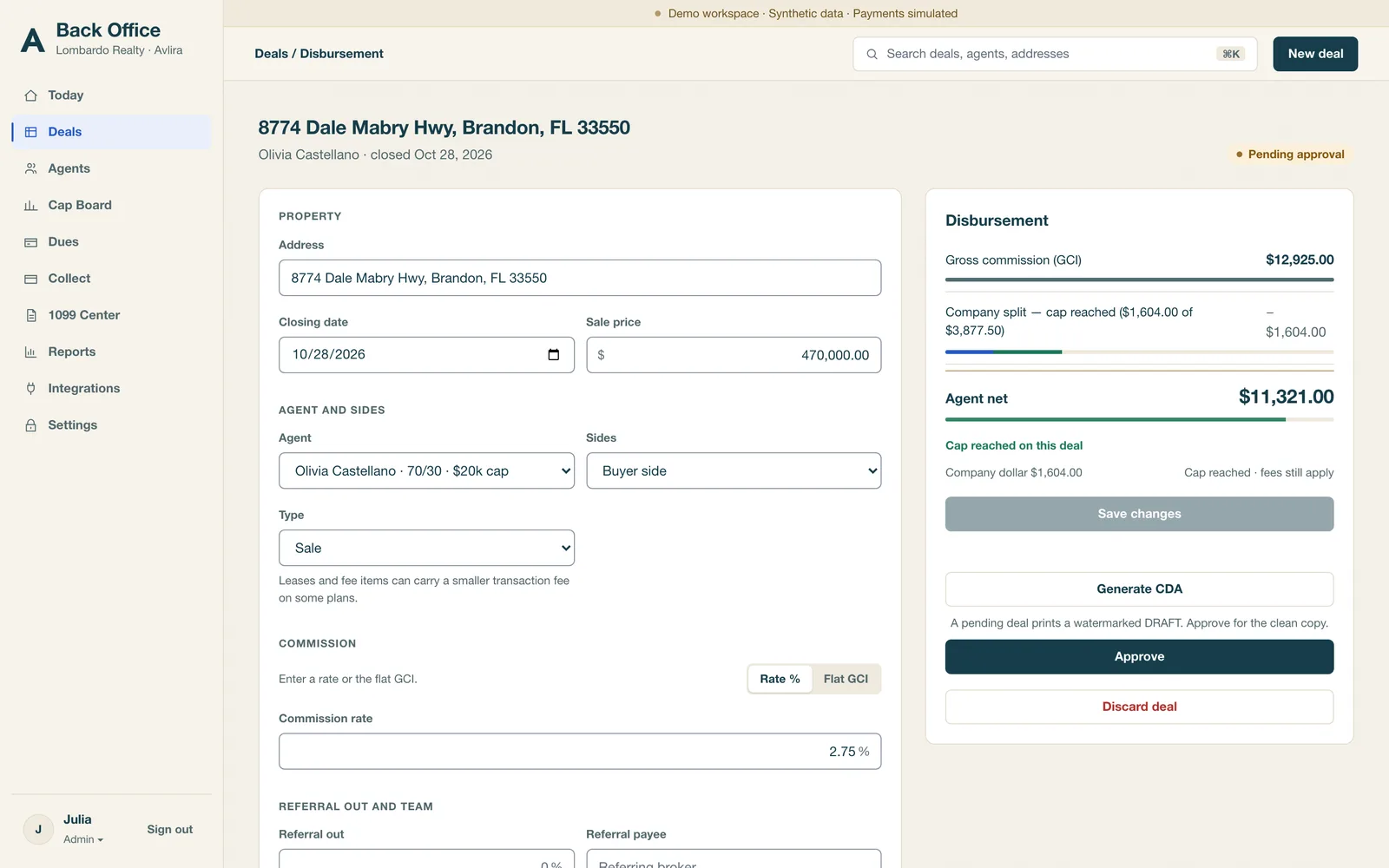
Avlira calculates flat-fee plans and split-with-cap plans. When an agent crosses their cap in the middle of a deal, the crossing is pro-rated across that deal rather than applied all at once. Referral fees and team-lead splits are part of the same calculation, not a second spreadsheet. Every result is computed to the cent.
- Flat-fee plans a fixed fee per side, with the rest to the agent
- Split with cap a split until the cap is met, then the agent's side changes
- Pro-rated cap crossing the deal where the cap breaks is split the honest way
- Referrals inbound and outbound referral fees carried as their own lines
- Team leads team splits and lead fees applied on the same transaction
- To the cent totals round once, at the end, and the lines always add up
If a number is questioned, the answer is on the screen, not in someone's memory.
CDA PDFs
The CDA, generated from the deal.
Avlira produces the commission disbursement authorization as a clean PDF, built from the transaction and the commission calculation it just ran. Prices, splits, fees, referral deductions and payout amounts come from one record, so the CDA cannot quietly disagree with the ledger. Send it, file it, or download it to sign the way you already do.
- Generated from the live commission calculation, not retyped
- Brokerage name and branding on the document
- Stored against the transaction with a record of when it was produced
- Download as PDF for your existing signature process
1099 center
1099s are a year-long job done in small pieces.
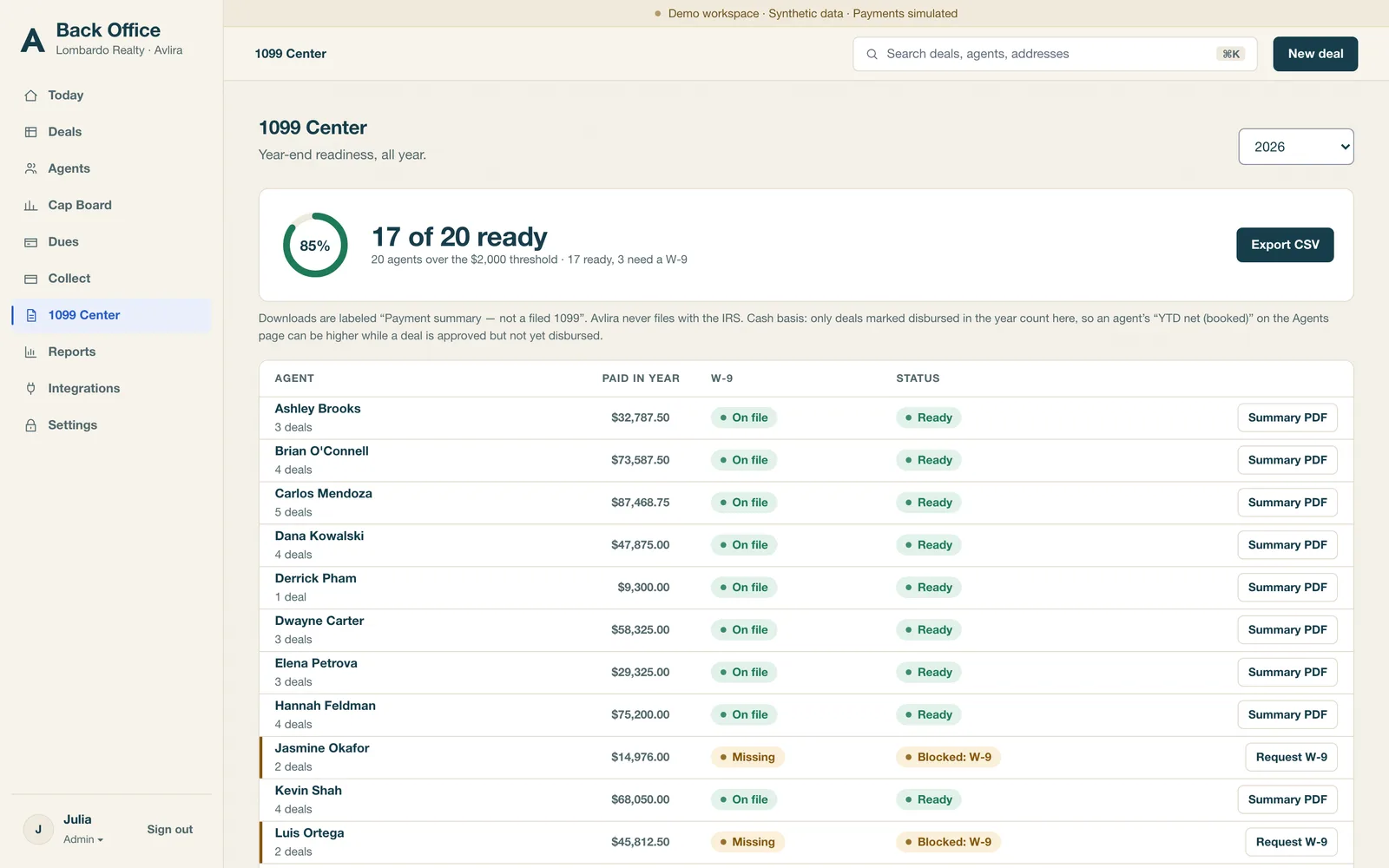
The 1099 center keeps one payee record per agent: legal name, business name, entity type, and whether the signed W-9 is on file. Payments accrue to that record all year, so December is a review rather than a reconstruction. You can see who is missing a W-9 in July while the agent is still in the building.
- Per-payee totals built from the commission ledger
- W-9 status as a visible flag, not a folder someone remembers
- Year-end export for filing
- No SSN or TIN typed into Avlira, ever
Ask your CPA to confirm thresholds and deadlines for your year. We keep the record complete; your accountant decides what gets filed.
Agent app
An app on the home screen, without the app store.
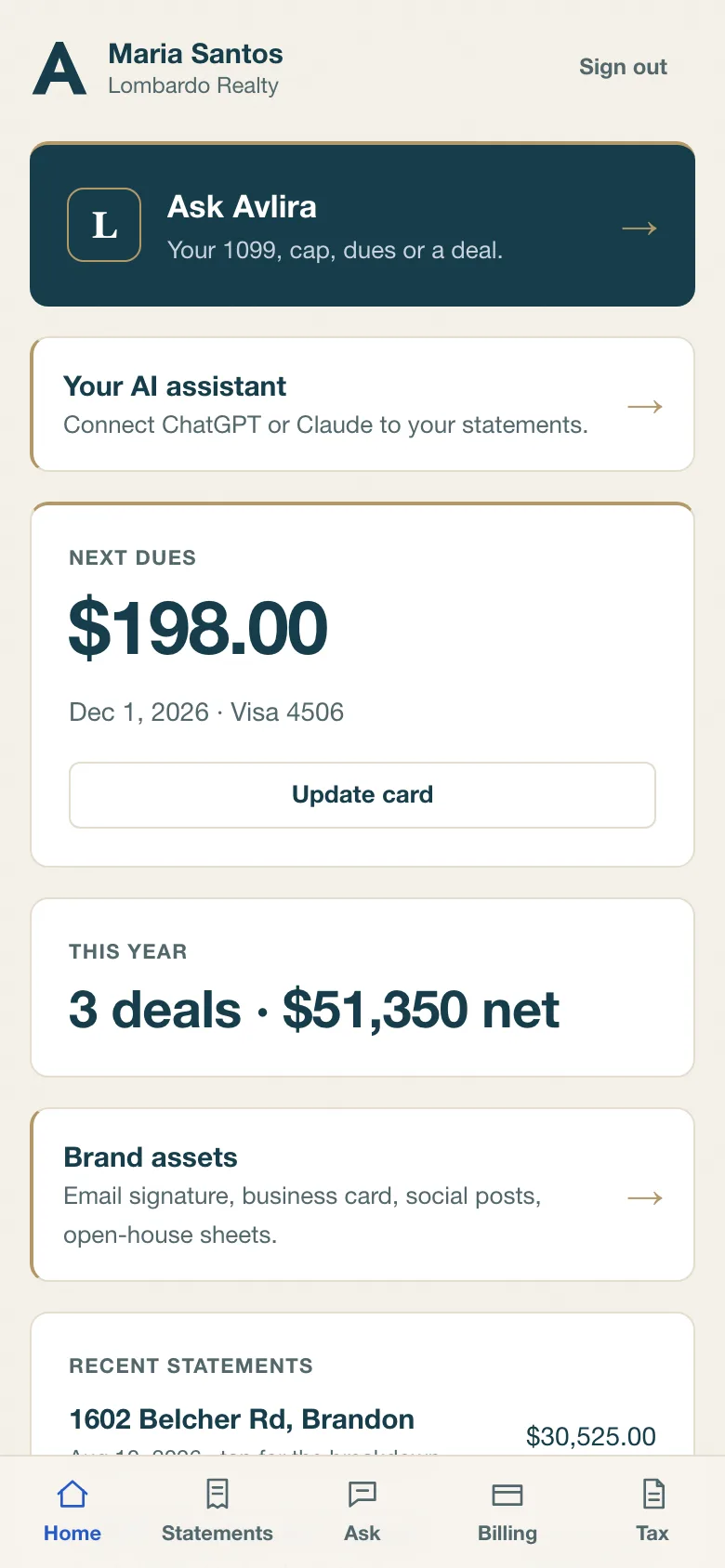
Agents add Avlira to their phone home screen and it opens like an app: icon, full screen, no browser chrome. Sign-in is a code texted to their mobile. Nothing to remember, nothing to reset, nothing to install or update. Inside, an agent sees their own production, statements, cap progress, dues and onboarding checklist.
- Home-screen install on iPhone and Android
- Sign-in by texted code — no passwords
- Their own numbers only: statements, cap, dues, 1099 status
- Works on the phone the agent already has
Agent AI access
Each agent's own AI, connected to their own records.
An agent can connect the ChatGPT or Claude account they already pay for. They sign in with a one-time code, approve read-only access, and from then on their assistant can answer questions like "what did I net on the Maple Street closing" or "how far am I from my cap" using their real figures.
- Their assistant, their subscription — you do not buy AI seats
- Read-only scopes, granted and revoked by the agent
- One agent's data per connection, never office-wide
- A full explanation of what the AI can and cannot do lives at /for-ai
New-agent onboarding, W-9 and de-boarding
Recruited on Monday. Working on Thursday.
When a recruit says yes, you send one invite link. The agent confirms their details, enters their Florida license number and expiration, reviews the plan you picked in plain words, acknowledges the independent contractor agreement you uploaded, and uploads a signed W-9. Each step is timestamped and visible on the agent's page, so you always know what is waiting on them.
- One invite link, four short steps, saved as the agent goes
- License number and expiration captured up front
- Agreement acknowledgement recorded with name, time and a hash of the document shown
- W-9 uploaded as a file — never typed as a number
- Office checklist that runs itself: what is done, what is waiting, what is next
- Linked to your recruiting CRM a signed intake API starts onboarding from the recruit card, and the agent record links back (one CRM is wired today; others connect through the same API)
- Activates on your word a recruit cannot activate themselves
- De-boarding settle open commissions, close the dues balance, revoke access, keep the record
Brand asset kit
On-brand marketing, without a design request.
Every brokerage on Avlira gets a brand asset kit built from its own logo, colours and fonts: email signature, business card, open-house flyer sheet, and listing post templates. An agent fills in the fields and exports. The result looks like your brokerage, not like a template library.
- Email signature, business card, open-house sheets, listing posts
- Generated in your brokerage's own brand, not ours
- Agent fills in details, exports, done
- Consistent output across the whole office
Florida license monitor
A weekly check on every license on your roster.
Every week, Avlira checks the Florida DBPR records for the licenses on your roster and flags anything unusual: expiring, inactive, or not found. You see it on the Today screen while there is still time to fix it, instead of hearing about it from a deal that fell apart at closing.
- Weekly comparison against Florida DBPR data
- Flags for expiring, inactive and unmatched licenses
- Sits on the Today screen, not in an email nobody opens
- Built for Florida brokerages; other states are not covered today
Your own branded instance
Your brokerage's software, with your name on it.
Each brokerage gets its own instance with its own domain, its own branding and its own users. Your agents see your brokerage, not a shared portal with other firms behind it. Your data is yours: separate from every other brokerage on the platform, exportable, and never mixed into an office-wide pool you do not control.
- Your domain, your logo, your colours
- Separate data per brokerage
- Your agents, your plans, your history — exportable
- One place for the office manager, not a login per tool
Integrations (what exists today)
Three integrations. We will not list more than we can show you.
- dotloop import closed loops and turn them into draft transactions with the details already filled in.
- QuickBooks export send your accounting entries where your bookkeeper already works.
- BrokerSumo CSV import bring agents, plans, transactions and commission lines across from BrokerSumo.
If something you rely on is missing, tell us in the demo and you will get a straight answer about whether it is coming.
Book a demo — bring one plan and one closed deal.